

- What mid and side actually are, and what lives in each
- Six situations where M/S earns its place, with techniques from Dave Kutch, Glenn Schick and Luca Pretolesi
- When to leave it alone, with a warning from Bob Katz
- Why analog M/S matters, and the story of how Plugin Alliance founder Dirk Ulrich discovered it
- A step-by-step M/S mastering workflow on Bettermaker hardware
- How Bettermaker compares with other analog M/S hardware on the market
What is mid/side processing?
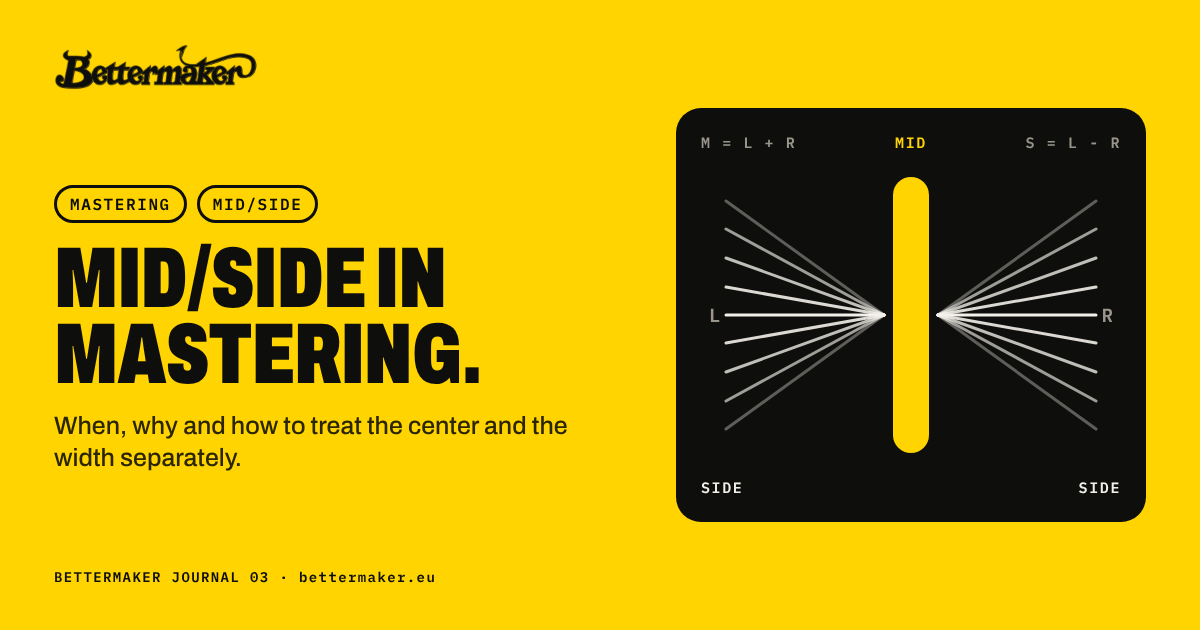
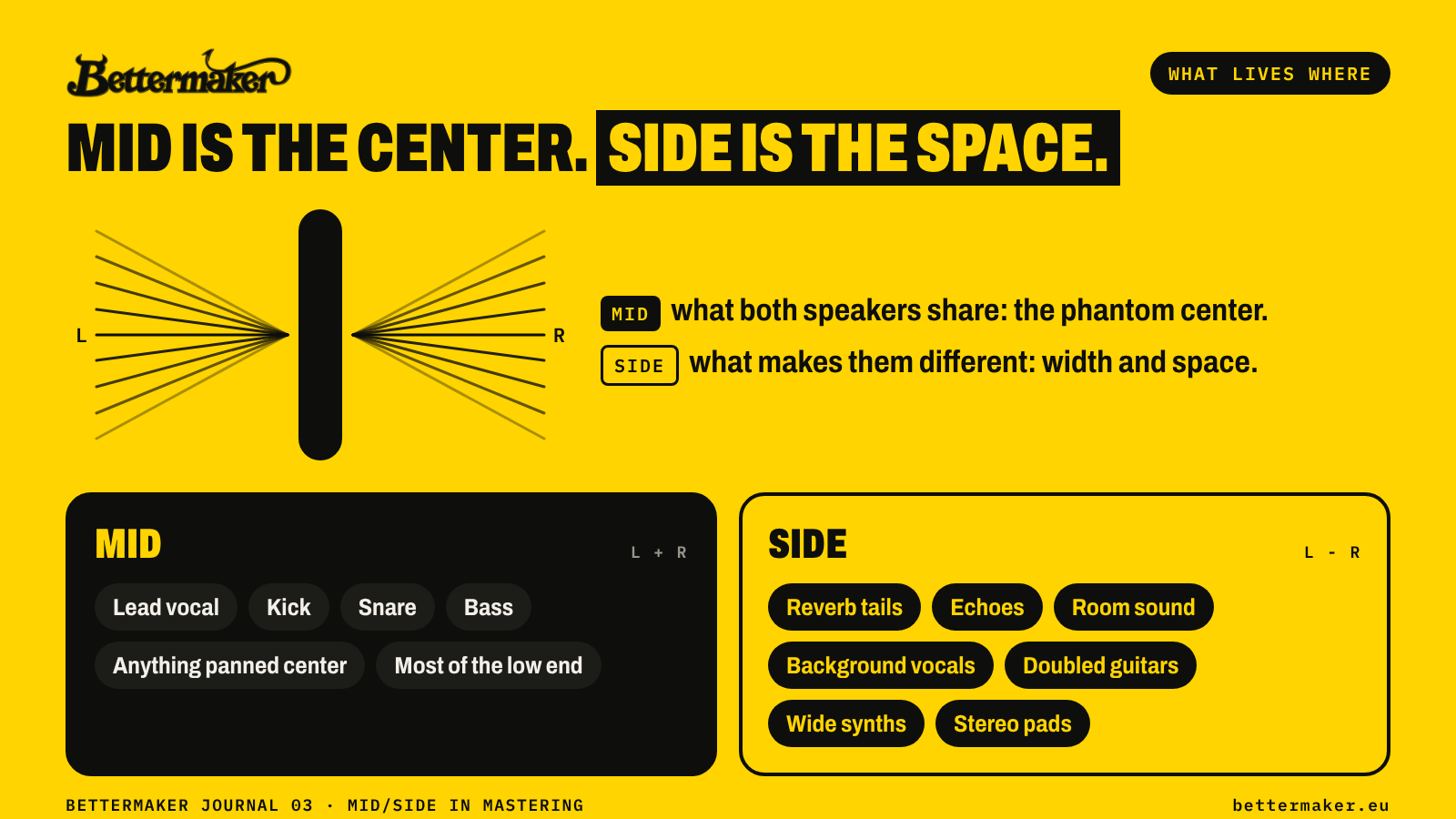
Mid/side is a different way of describing the same stereo signal. Instead of left and right, you get:
- Mid = L + R. Everything the two channels share: the phantom center.
- Side = L - R. Everything that differs between them: width, space, stereo effects.
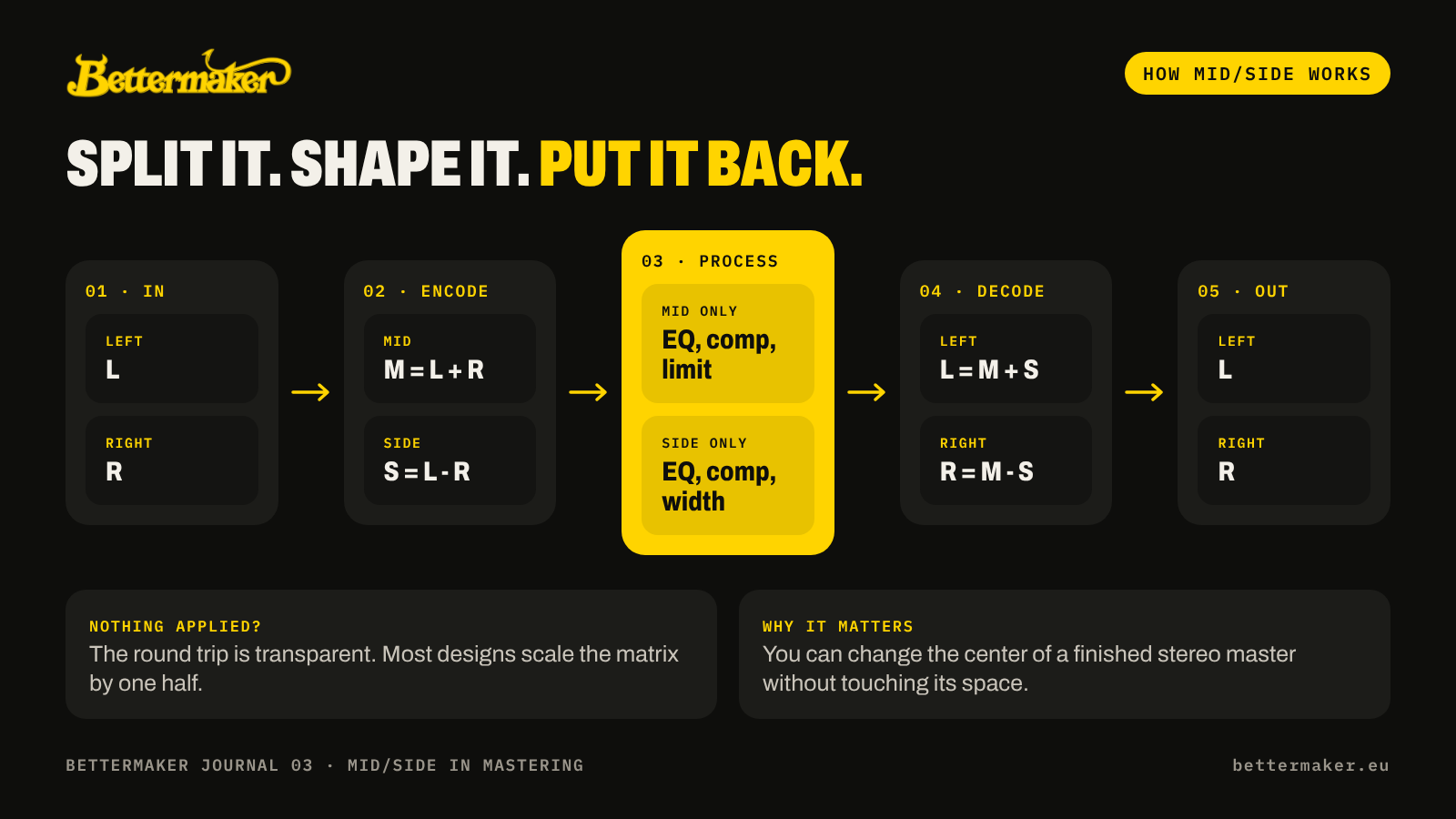
An M/S processor encodes left and right into mid and side, lets you EQ, compress or limit each one separately, then decodes back to left and right. With nothing applied, the round trip is transparent: L = M + S and R = M - S (with a level scaling of one half in most designs).
What lives where, in a typical modern mix:
| Mid (center) | Side (width) |
|---|---|
| Lead vocal, kick, snare, bass | Reverb tails, echoes and room sound |
| Anything panned center | Background vocals, doubled guitars, wide synths |
| Most of the low end | Stereo pads, delays and effects |
Mastering engineer Dave Kutch of The Mastering Palace in New York, whose clients include Alicia Keys, puts the lead vocal "definitely in the middle," while "normally reverb sits in the stereo sides." Mastering engineer Glenn Schick adds that in the side channel "you're going to hear things like reverbs, you're going to hear an echo." That split is why M/S is so useful: it gives you a handle on the center and the space of a finished stereo file, without stems.
When does M/S help in mastering?
M/S earns its place when a stereo processor would fix one problem by creating another. Six situations come up again and again:
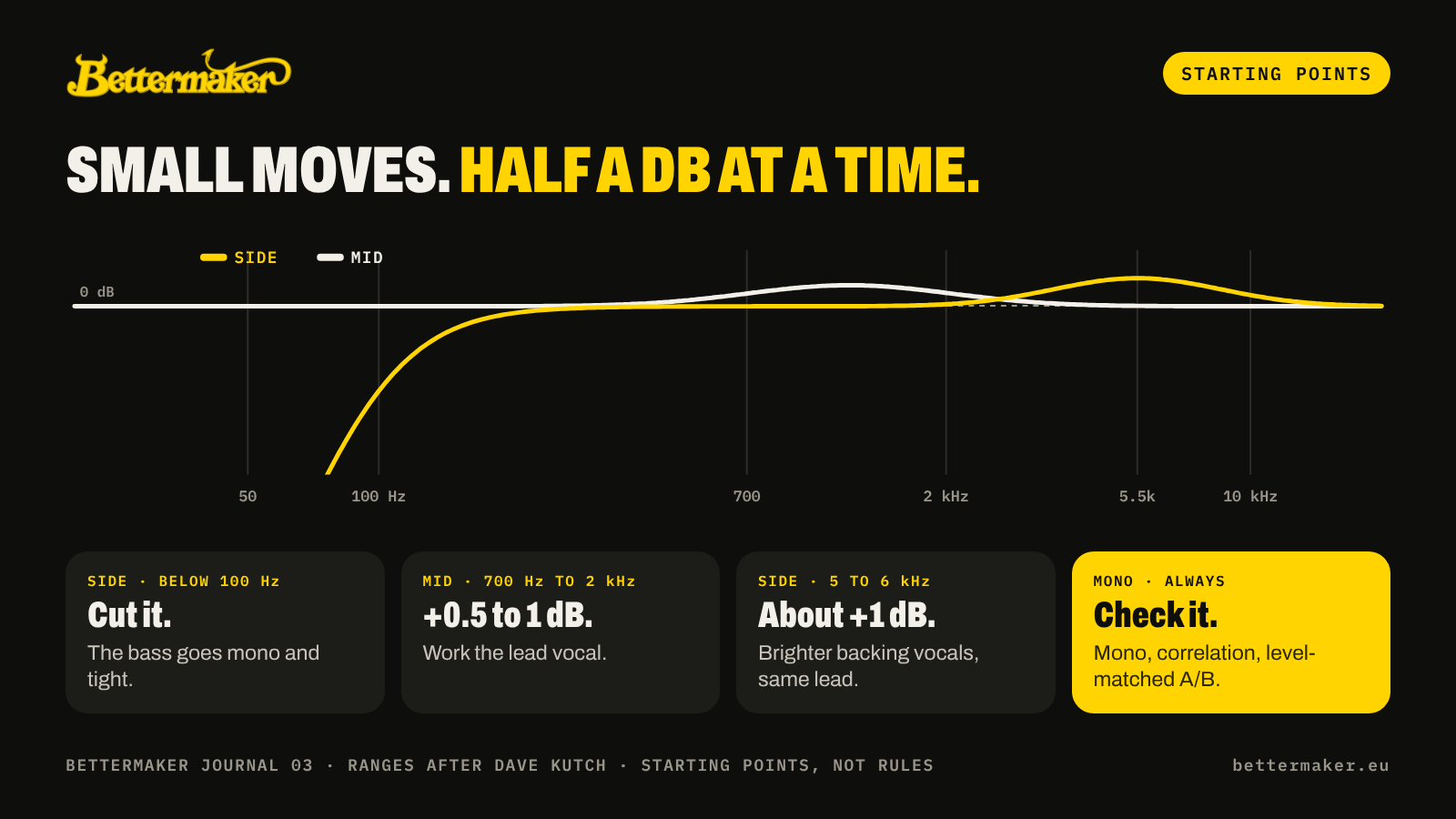
- A loose, wide low end. Cutting or shelving the side below roughly 100 Hz puts the bass in mono, which tightens it on club systems and phones and protects vinyl cutting.
- A lead vocal that sits too far back. A small lift in the mid brings the center forward without making the reverbs and wide guitars brighter too. Kutch works the lead vocal in the mid: "I can grab 1k, I can grab anywhere between 700 and 2k, and start working that center."
- Background vocals that sound dull. Kutch's classic example: a stereo boost between 4 and 10 kHz brightens the background vocals, but the lead now sounds "scratchy and a little nasty." In M/S he lifts only the side, "somewhere in 5K, 6K range," plus a touch around 180 Hz for body. "This is the beauty of working in M-S," he says. "We can now EQ just the stereo sides."
- A midrange that needs to come forward. Luca Pretolesi, a Bettermaker Mastering Limiter 2.0 user, compresses in M/S with the detector fed only midrange. "I don't wanna compress the bottom; I want to compress the midrange and bring the midrange in front of the mix," he explains. He filters the sidechain at both ends so the bass and the top never trigger gain reduction.
- Peaks in the center, space at the sides. Kick, snare and vocal peaks live in the mid. Compressing or limiting in M/S lets you control them without squeezing the reverbs and stereo effects that give the master its depth.
- A mix with too much reverb. Because reverb lives mostly in the side, a gentle cut there dries the mix without touching the vocal. Kutch: "Normally reverb sits in the stereo sides, and you can take it and subtract it." Glenn Schick reaches for the same tool: "If I need to work on a really booming reverb or something, I probably want to work in a mid/side EQ."
Notice the pattern: each move is small and targets one region of one channel. That is the whole art of M/S.
When should you leave M/S alone?
When the mix is already right. M/S changes the stereo image the mix engineer built, and it is easy to hear a dramatic change and mistake it for an improvement.
Bob Katz, author of Mastering Audio, describes M/S processing as "powerful but also screws up the mix if overused." A sensible dose is half a decibel to 1 dB per move.
Three checks before you commit to any M/S move:
- Listen in mono. Side information disappears in mono. A master that relies on boosted sides for its excitement will sound dull on a phone speaker or a mono club system.
- Watch phase correlation. A correlation meter that hangs near or below zero after an M/S move is a warning that the width came at the cost of mono compatibility.
- Level-match the comparison. A side boost also raises the overall level slightly. Compare at equal loudness, or the louder version will win every time.
If the mix has no specific stereo problem, a well-chosen stereo EQ on the whole master is usually the better choice.
Analog M/S: where it came from and why hardware still matters
M/S began as a microphone technique and moved into mastering through external matrix boxes wired around a stereo EQ. Dirk Ulrich, founder of Brainworx and Plugin Alliance, Bettermaker's plugin partner, remembers the moment he heard it in a Cologne mastering studio: "He pressed a few buttons and listened to only the mid and side channels of that recording and I was just completely blown away." That experience led to bx_digital, the plugin that brought M/S EQ to the masses.
Today most engineers meet M/S in plugins. Analog M/S still has a place for the same reason analog processing does: the matrix, the EQ curves and the compression all happen in the analog domain, with the harmonic character and headroom of the circuit. The historic drawback was workflow. An external matrix meant patching, and an M/S setting on hardware was hard to recall.
Dave Kutch, who discovered M/S around 1999 and calls it "an essential tool in how I work," is specific about the hardware. "You have to use an EQ that's detented, it's gotta be a high-quality EQ," he told a mastering seminar at Flux Studios in New York. "If it's a variable pot, you're gonna have phase issues, and your images may collapse." He has also tried plugins with M/S built in, and says the result "just doesn't sound the same."
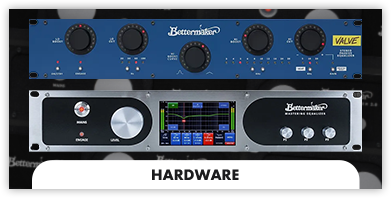
Bettermaker builds the matrix into the units, sets every parameter digitally instead of with free-running pots, and puts every setting under DAW control:
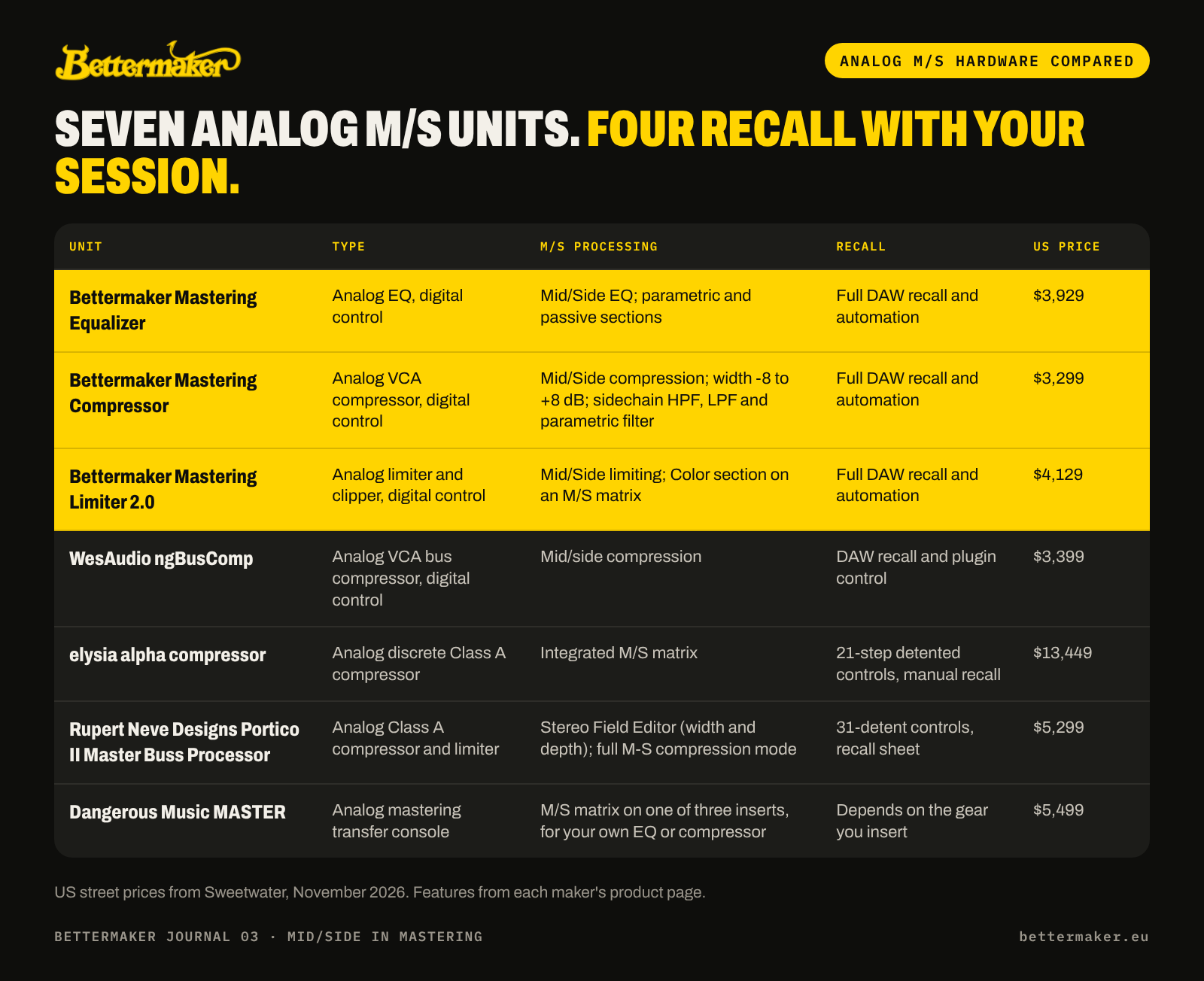
- Mastering Equalizer: stereo, dual mono and Mid/Side operation, with a parametric section and a passive section, 100% analog signal path.
- Mastering Compressor: VCA compression in stereo, dual mono or Mid/Side mode, a width control from -8 dB to +8 dB in M/S mode, and a sidechain with a high-pass filter up to 370 Hz, a low-pass filter from 2 kHz and a fully parametric sidechain filter.
- Mastering Limiter 2.0: a Mid/Side processing mode for limiting, and a Color section built on an M/S matrix with two saturation modules.
Every parameter is saved with the session and can be automated through the Bettermaker plugin, so an M/S move on analog hardware is as repeatable as one in software.
A step-by-step M/S mastering workflow
A practical order on a Bettermaker chain, Mastering Equalizer into Mastering Compressor into Mastering Limiter 2.0. The numbers are starting points, not rules.
- Listen in stereo and in mono first. Decide which problem you are solving: low end, center, width or dynamics. No problem, no M/S.
- Solo mid, then side. Use the Mastering Compressor's solo function, or an M/S monitor in your DAW, to hear what each channel holds. You will often find harshness or mud that lives in one channel only.
- Clean the side low end on the EQ. Switch the Mastering Equalizer to Mid/Side and high-pass or shelve the side below about 100 Hz.
- Shape the center. A gentle lift on the mid somewhere between 700 Hz and 2 kHz, the range Dave Kutch works for lead vocals, by 0.5 to 1 dB, brings the vocal forward.
- Open the sides, gently. If background vocals or the top of the master feel dull, lift the side around 5 to 6 kHz by about 1 dB.
- Compress the midrange in M/S. On the Mastering Compressor in Mid/Side mode, set the sidechain high-pass and low-pass filters so the detector hears only the midrange, the approach Luca Pretolesi uses. Use the width control sparingly to set the final balance of center and sides.
- Limit with the center in mind. In the Mastering Limiter 2.0, Mid/Side mode lets center peaks be controlled without squashing the sides.
- Check mono, correlation and level-matched A/B. Then save the session. Every M/S setting on all three units recalls with it.
One honest note: every step above can be skipped. The best M/S move is often the one you decide not to make.
Analog M/S hardware compared: Bettermaker, WesAudio, elysia, Rupert Neve and Dangerous Music
Analog M/S hardware is not rare. What separates the units is what they process (EQ, compression, limiting, or a matrix for gear you already own) and whether your settings come back with the session. US street prices from Sweetwater, November 2026.
FAQ
What is mid/side processing in mastering?
It converts left and right into mid (L + R, the center) and side (L - R, the width), processes each separately, then converts back. It lets you change the center of a mix without touching its space, and the other way round.
Should the bass be mono in a master?
In most modern music, yes, below about 100 Hz. Cutting the side channel in the low end puts the bass in the center, which keeps it tight on club systems and phones and avoids problems on vinyl.
How much M/S EQ should I use?
Very little, usually half a dB to 1 dB per move. Larger changes rewrite the mix engineer's stereo image.
Does M/S processing hurt mono compatibility?
It can. Boosted side information disappears in mono, so a master that relies on it sounds duller on mono playback. Always check in mono and on a phase correlation meter.
What is the difference between M/S EQ and M/S compression?
M/S EQ changes the tonal balance of the center or the sides. M/S compression controls their dynamics separately, for example compressing the center to bring the vocal and snare forward while leaving the reverbs open.
Can analog hardware do M/S with recall?
Yes. The Bettermaker Mastering Equalizer, Mastering Compressor and Mastering Limiter 2.0 all have built-in M/S modes, with every setting recalled and automated from the DAW through the Bettermaker plugin.
Sources
- Dave Kutch, Mid-Side Mastering Techniques, Dangerous Music seminar at Flux Studios, New York, May 2012
- Glenn Schick, Mastering with Headphones, Plugin Alliance
- Bob Katz, Bonus Interview, Tape Op #116
- Dirk Ulrich, An interview with Plugin Alliance Founder Dirk Ulrich, KVR Audio
- Luca Pretolesi, Compressing the midrange of the mix, Puremix, October 2023
- Bettermaker, MASTERING bundle, Mastering Compressor, Mastering Limiter 2.0
- WesAudio, ngBusComp
- elysia, alpha compressor
- Rupert Neve Designs, Portico II Master Buss Processor
- Dangerous Music, MASTER
- Prices: Sweetwater, November 2026
- Plugin Alliance, Brainworx bx_digital V3; FabFilter, Pro-Q 4