

- Why even great ears need meters, with advice from Ian Shepherd and Bob Katz
- The meters that matter and the question each one answers
- Loudness targets for streaming and broadcast
- On-screen meters versus a dedicated hardware meter like Bettermaker Meterbox
- How Meterbox compares with TC Electronic Clarity M Stereo, iZotope Insight 2 and the meters in your DAW
Why do your ears need meters?
Because hearing is relative. Three things push every engineer off course during a long session:
- Louder sounds better. A level change of a decibel or two is easy to mistake for a better mix. Without a loudness reading, every A/B comparison is biased toward the louder version. As mastering legend Bob Ludwig of Gateway Mastering puts it, "People are naturally attracted to louder versions of the same music."
- Ears adapt. After a few hours at volume, the top end dulls and judgment drifts. The mix that felt balanced at noon sounds harsh the next morning.
- The room lies. Room modes boost or cancel bass at the listening position. An analyzer shows what is really there, not what the room is doing to it.
Meters do not replace listening. They keep it honest. As iZotope puts it, "Proper visualizations are a great safeguard against our own flawed sense of subjective perception."
Mastering engineer Ian Shepherd trusts loudness metering for exactly that reason: "LUFS is a remarkably effective measurement. It agrees with my ears a lot of the time and works well with something like 90 percent of material." Bob Katz, creator of the K-System and author of Mastering Audio, argues that for consistent levels, "Proper metering and monitoring practice is the only solution."
Which audio meters matter, and what does each one tell you?
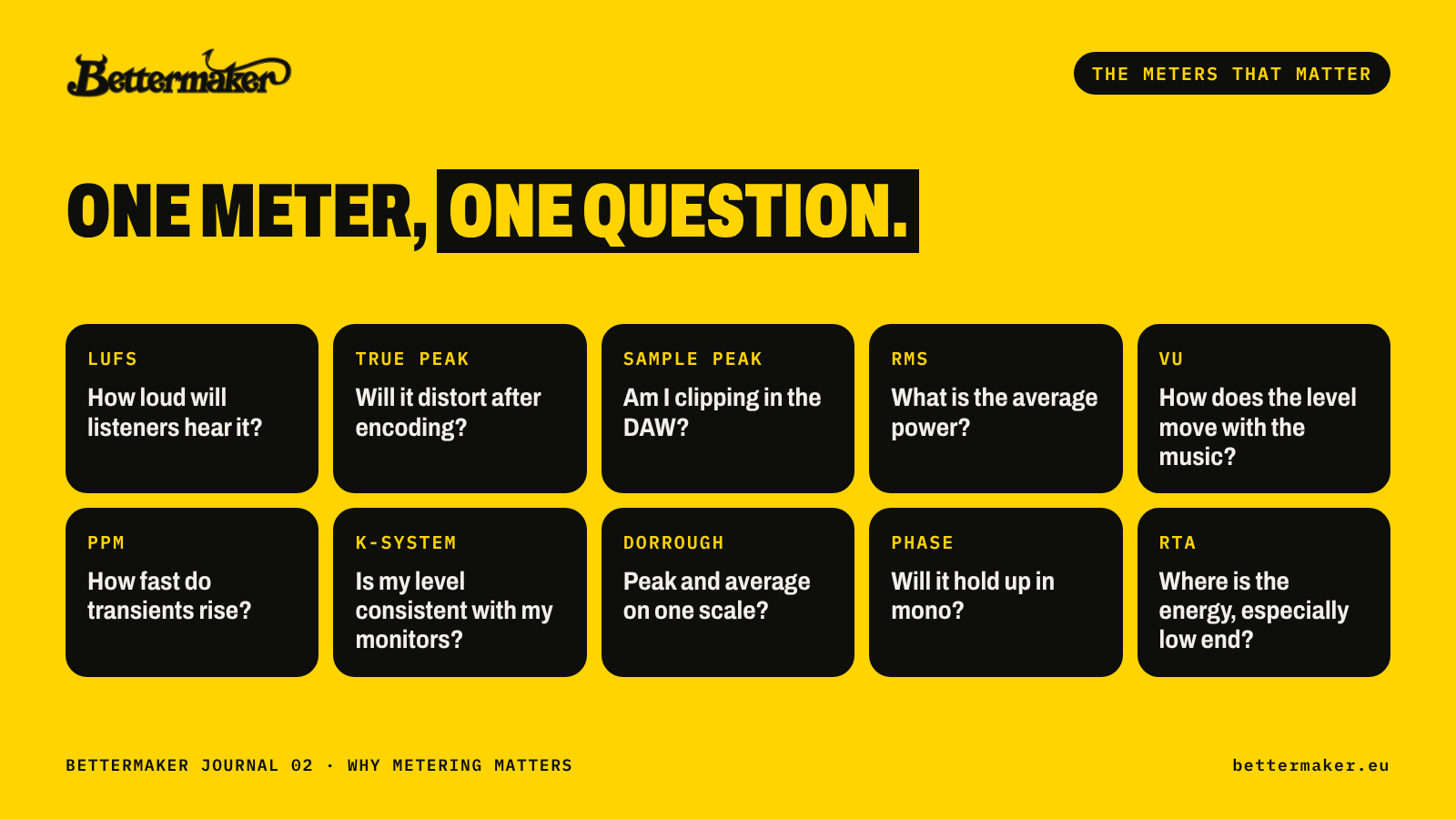
Every meter answers one question. Knowing the question tells you when to look at it.
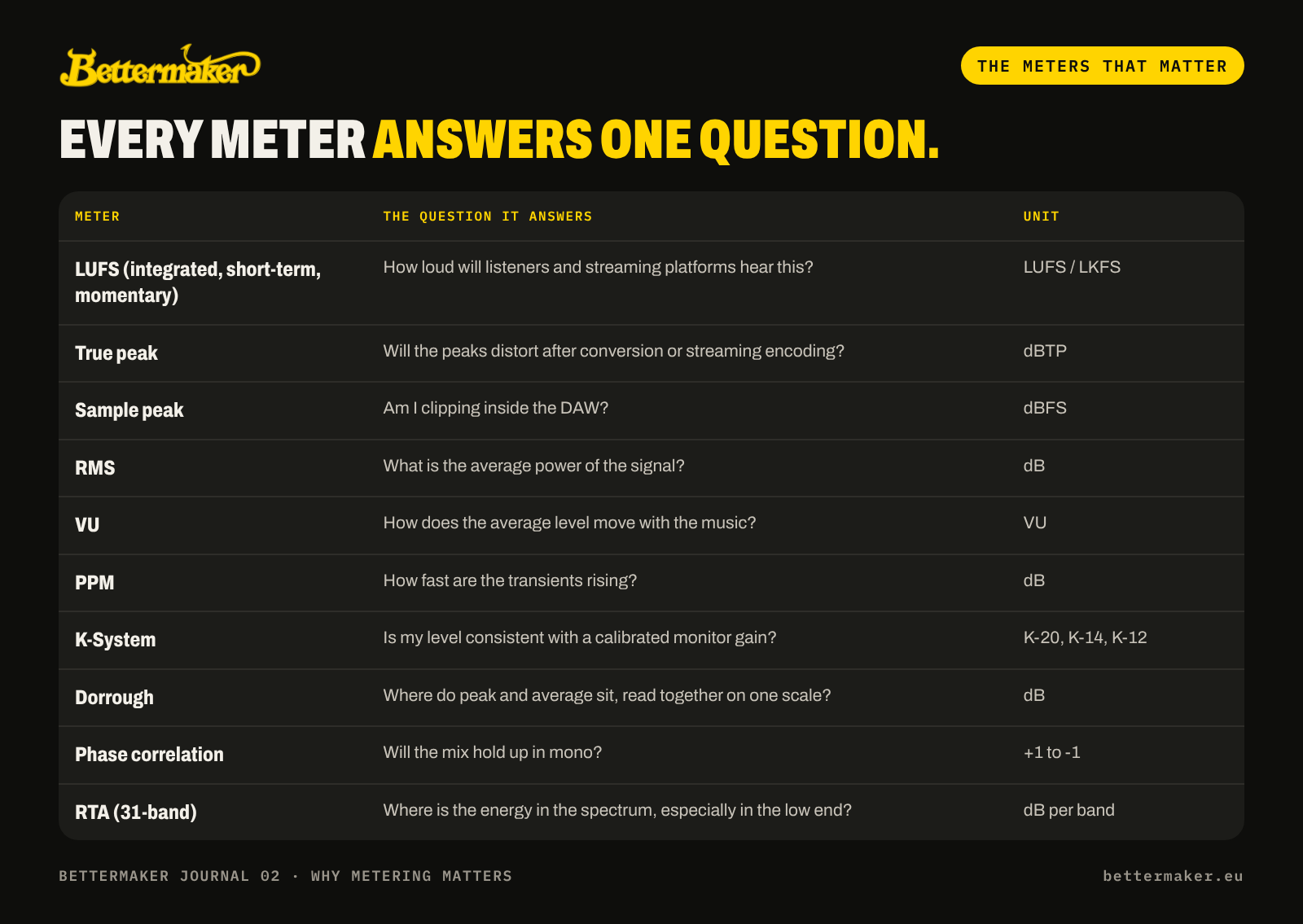
- LUFS is defined by the ITU-R BS.1770 standard and is the measure streaming services use to normalize playback.
- True peak meters use oversampling to reconstruct the waveform between samples, so they catch peaks a sample peak meter misses.
- VU still earns its place. Shepherd again: "I still use a VU meter, too, because there are important things about them that aren't replicated in most loudness meters."
- K-System ties the meter to monitor gain. In Bob Katz's words, "The K-System is not just a meter scale, it is an integrated system tied to monitoring gain." K-20 is for wide dynamic range material, K-14 for "the vast majority of moderately-compressed high-fidelity productions", and K-12 for broadcast.
- Phase correlation near +1 means the left and right channels agree. Readings that hang below zero warn you that parts of the mix will cancel in mono, on phone speakers and on many club systems.
What loudness should you aim for?
Aim for the loudness that serves the music, then check it against the platform it is going to. Every platform plays back at its own reference level, and a track louder than that level is turned down. The main ones, music first, then podcasts, broadcast and film:
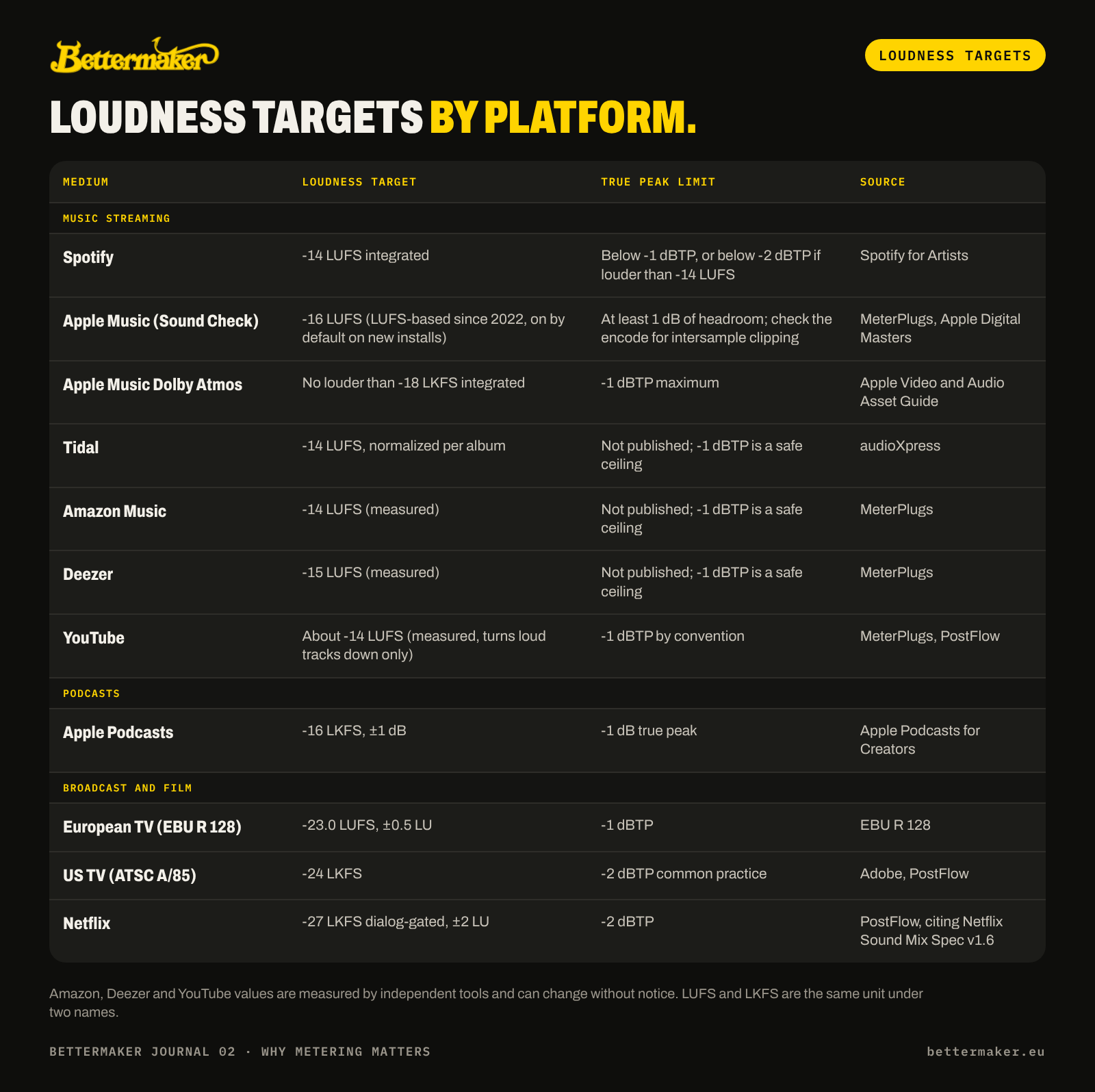
Music services publish less than broadcasters do. Spotify, Apple Podcasts, the EBU and Netflix publish their numbers; the Amazon, Deezer and YouTube values are measured by independent tools and can change without notice. Apple publishes hard limits for Dolby Atmos music but no stereo target: the -16 LUFS Sound Check level is measured, and matches the AES TD1008 recommendation for streaming. Apple's own stereo guidance is to leave at least 1 dB of headroom so the AAC encode does not clip between samples. LUFS and LKFS are the same unit under two names.
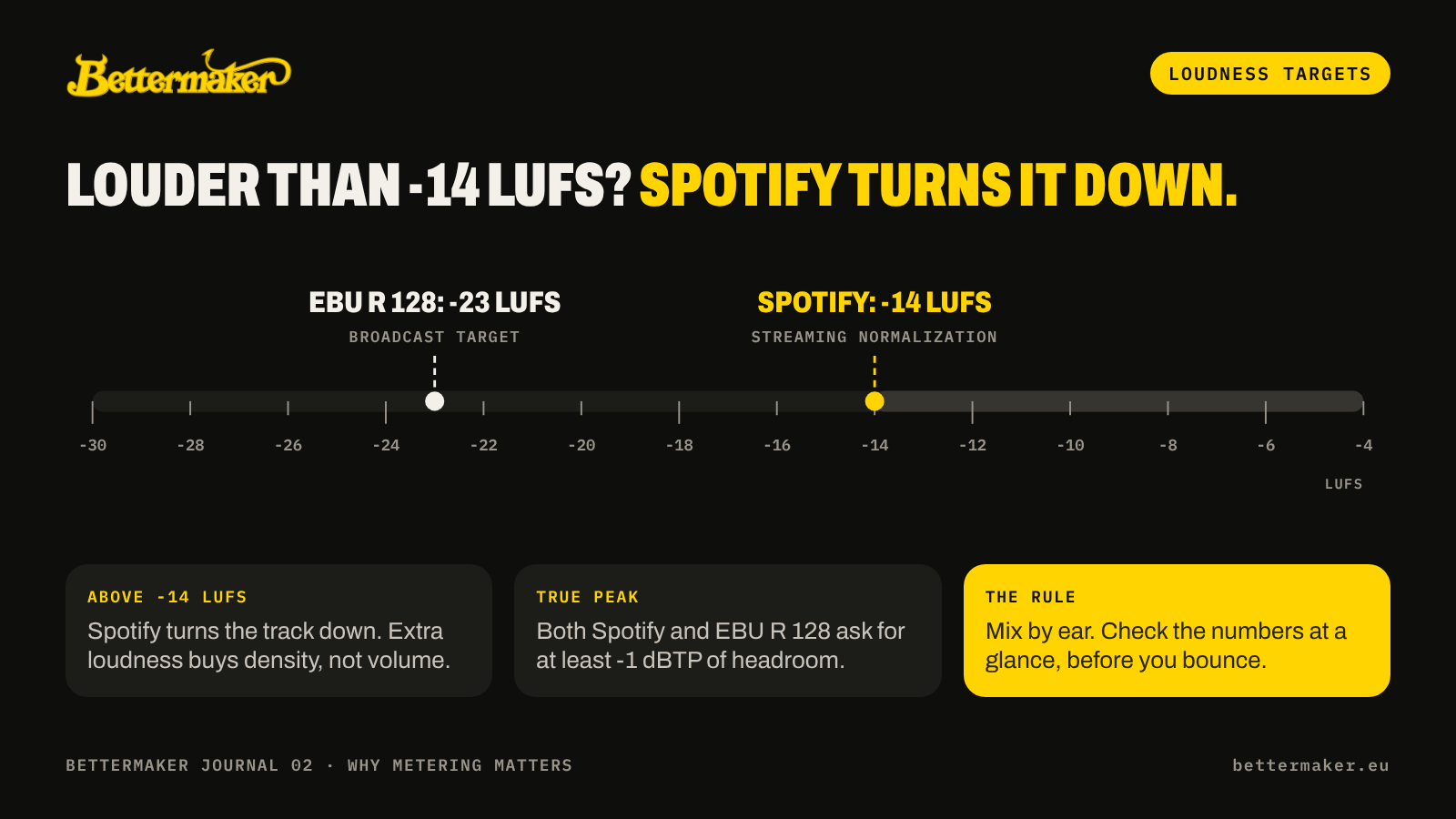
Two things follow from these numbers. First, a master much louder than -14 LUFS is simply turned down on Spotify, so extra loudness buys density, not volume. Second, true peak matters everywhere: both Spotify and the EBU ask for at least 1 dB of true peak headroom.
George Massenburg, inventor of the parametric equalizer, wrote in Mix that when an artist asks why a track sounds quieter, the fix is not simply to turn it up. The team should insist on "conclusive, collaborative loudness measurements" and compare against real references. His plea to mixers is blunter: "Wouldja PLEASE stop crushing digital mix busses?"
Meters and ears answer different questions, and the best engineers use both. Luca Pretolesi of Studio DMI in Las Vegas (Diplo, Major Lazer, Steve Aoki), a Bettermaker Mastering Limiter 2.0 user, comparing analog clipping with plugins that imitate it, found: "Based on my meters, it's the same loudness but it just sounds a little smaller and artificial." The meter proved the level was equal, so the difference he heard was real. And Ian Shepherd does not stare at the numbers while working: "I don't watch the loudness meter when I work; I just check it afterwards."
That habit, a quick glance instead of constant watching, is the key to the next question: where the meters should live.
On-screen meters vs a dedicated hardware meter
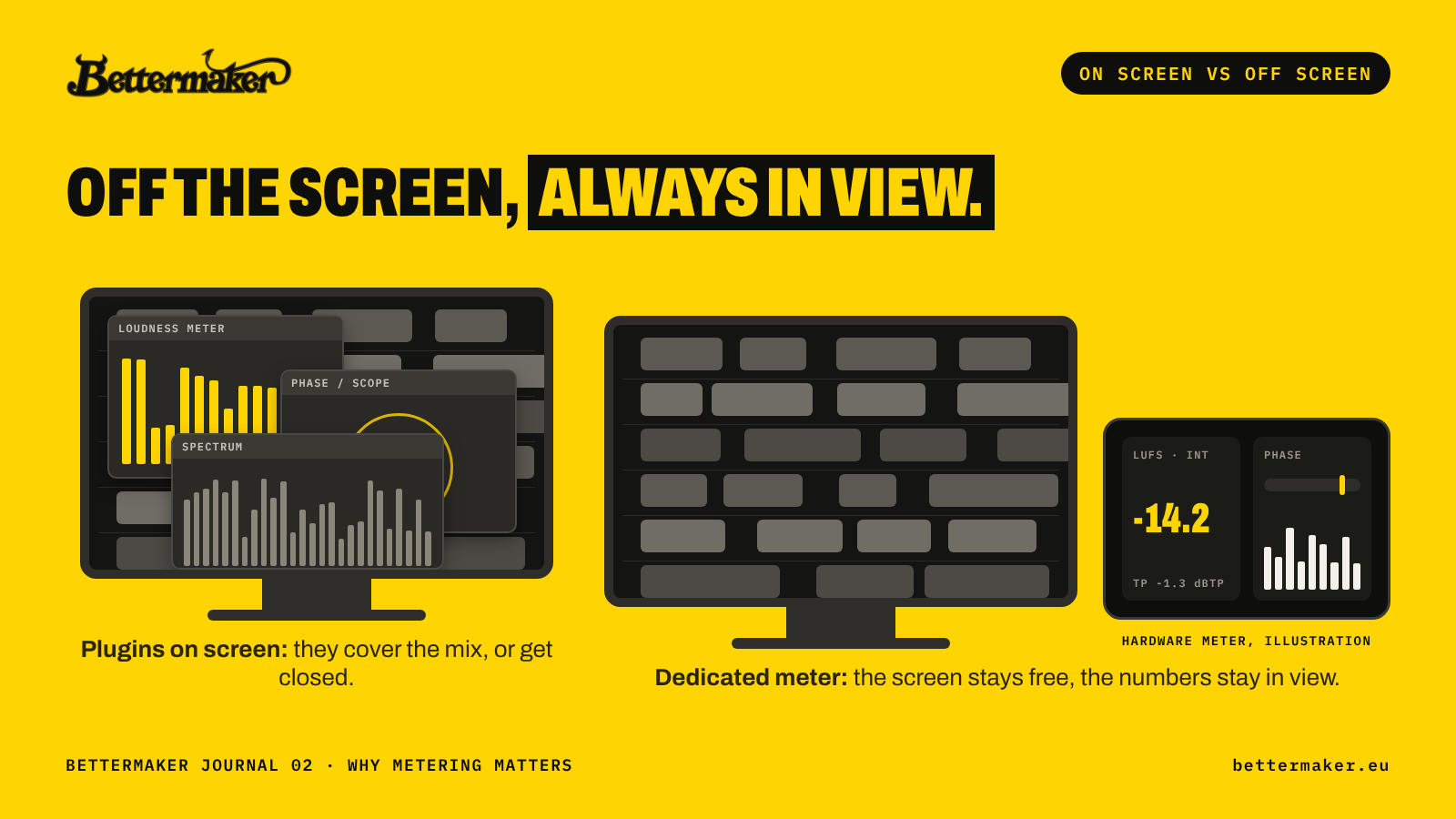
Most engineers meter with plugins, and the problem is not accuracy. It is attention. A metering plugin competes for the same screen as the edit window, the mixer, the EQ and the session notes. Either it covers something you need, or it gets closed and stops doing its job. Opening it again means leaving the music to go and look for a number.
A dedicated hardware meter changes the habit. The readings sit beside the monitors, always on, and a glance is enough. That is exactly how Shepherd describes using a loudness meter: check it, do not watch it.
What to look for in a hardware meter:
- Readable at a glance: matte, wide-angle displays that stay legible from the side of the desk or from the couch at the back of the room.
- Fed from the DAW: a plugin that sends measurements directly, so there is no extra audio routing to break.
- More than the master bus: the option to watch several tracks, buses or stems at once.
- The full set of meters: LUFS and true peak for delivery, VU or K-System for level, phase correlation for mono, an RTA for the low end.
This is the idea behind Bettermaker Meterbox: "Your metering, off the screen and always in view."
How to set up Meterbox: a practical workflow
Meterbox is a hardware metering station with two matte, wide-viewing-angle displays, fed by a plugin in your DAW. One USB-C cable carries both data and power. A practical setup:
- Connect one cable. USB-C to the computer, no power supply and no audio routing.
- Put the Meterbox plugin on the master bus. It is available in all major plugin formats and sends its measurements straight to the unit.
- Add Node plugins where you need eyes. Place them on tracks, buses or stems to watch 4 to 16 channels across the two displays: drums, bass, vocals and the master side by side.
- Split the displays. Show a different meter on each display, or use both for the left and right channels of one meter.
- Mix with level meters. Use K-System or VU for consistent level, or Dorrough to read peak and average together.
- Fix the low end with the RTA. Keep the 31-band analyzer up while balancing kick and bass, so the room cannot fool you.
- Check delivery before you bounce. Integrated LUFS and true peak on one display, phase correlation on the other.
- Watch the clock, not just the meters. The built-in session timer shows how long you have been listening, a simple reminder to rest your ears before judgment drifts.
The computer screen stays free for the music, and the numbers that decide whether a track is ready are always in view.
Meterbox vs Clarity M Stereo vs Insight 2 vs DAW meters
Every option below measures accurately. The differences are where the meters live, how many sources you can watch, and what you pay.
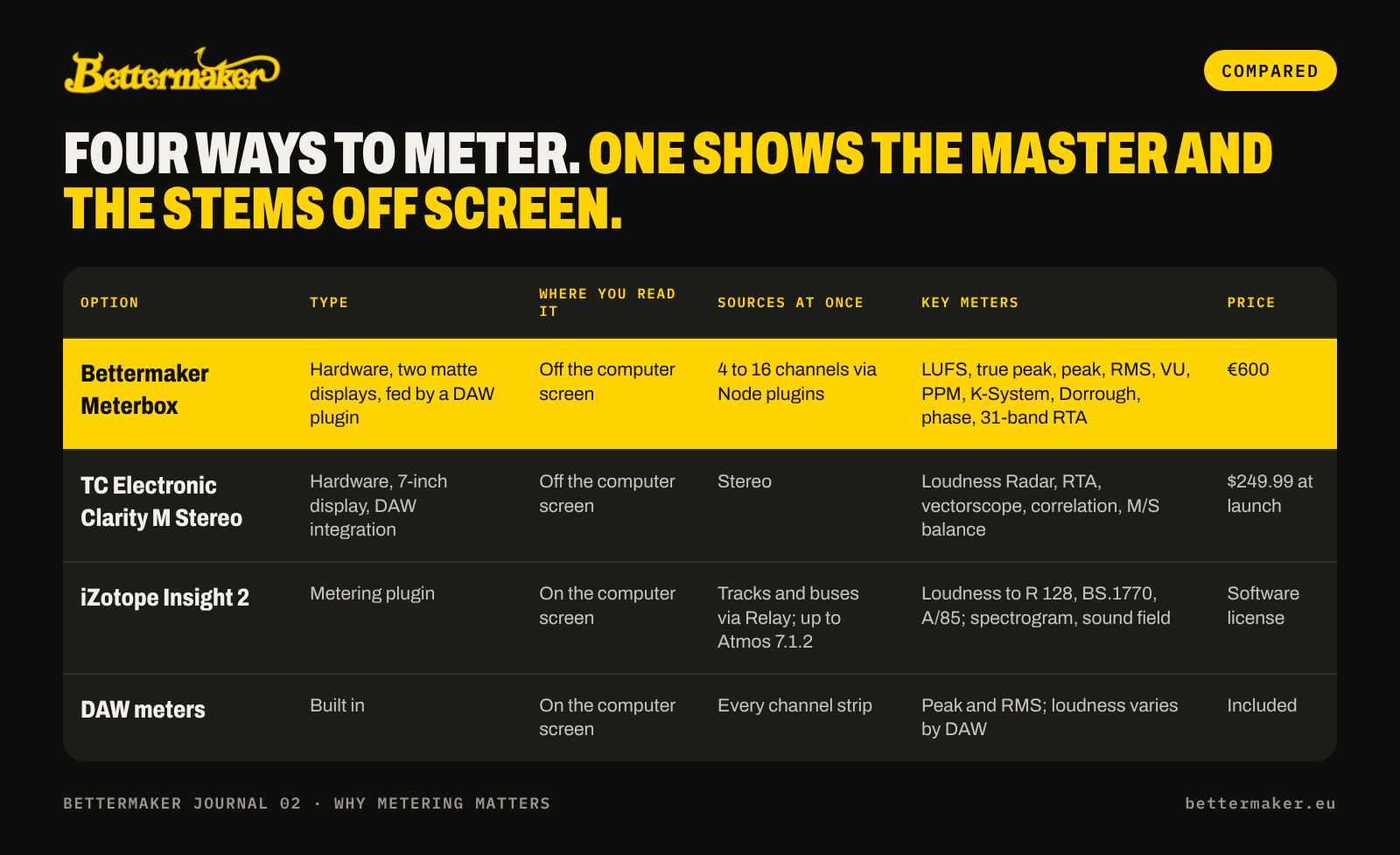
The honest summary: plugins and DAW meters give you the most data per euro, and the Clarity M is the budget hardware option for stereo. Meterbox is for engineers who want the full set of professional meters off the screen, and want to see the master and its key stems at the same glance.
FAQ
Why is metering important in mixing and mastering?
Because ears adapt to level, room and fatigue during a session. Meters give a fixed reference for loudness, true peak, phase and spectrum, so decisions made by ear can be confirmed before a track is released.
What is the difference between LUFS and dBFS?
LUFS measures perceived loudness over time, following ITU-R BS.1770. dBFS measures the level of individual samples against digital full scale. A track can peak at -1 dBFS and still be quiet or loud in LUFS.
What is a true peak meter?
A meter that oversamples the signal to reconstruct the waveform between samples. It shows peaks that can appear after conversion or streaming encoding, measured in dBTP.
What LUFS should I master to for Spotify?
Spotify normalizes playback to -14 LUFS integrated and recommends a true peak below -1 dBTP, or below -2 dBTP for masters louder than -14 LUFS. Master for the sound you want, then check these numbers.
What does a phase correlation meter show?
How well the left and right channels agree, from +1 (identical) to -1 (opposite). Readings that stay below zero warn that parts of the mix will cancel in mono.
Is a hardware meter better than a metering plugin?
Not more accurate, but easier to use. A hardware meter stays in view without taking screen space, so you glance at it instead of opening a window. Meterbox adds multi-channel metering through Node plugins.
Sources
- Ian Shepherd, Ian Shepherd On Loudness & Dynamics, Sound On Sound, April 2023
- Bob Katz, Level Practices (Part 2), Digido, April 2017
- iZotope, Loudness metering and visualizations in mastering
- Spotify for Artists, Loudness normalization
- EBU, R 128 Loudness normalisation and permitted maximum level
- Sound On Sound glossary, True peak meter
- Bettermaker Meterbox, Professional Audio Design and Vintage King
- TC Electronic Clarity M Stereo, Sonicstate
- iZotope Insight 2, Full Compass
- George Massenburg, The METAlliance Report: Modern Loudness, Mix, July 2019
- Bob Ludwig, Interview: Bob Ludwig, Master, Glide Magazine
- Luca Pretolesi, Psychology of a Mix Engineer, Modern Mixing
- Apple, Podcast audio requirements
- audioXpress, Tidal album loudness normalization, November 2017
- MeterPlugs, Loudness Penalty: Amazon and Deezer, October 2019
- Adobe, Broadcast loudness standards
- The PostFlow, Delivery specs cheat sheet
- MeterPlugs, Apple switches to LUFS, enables Sound Check by default, March 2022
- Apple, Apple Digital Masters
- Apple, Video and Audio Asset Guide (Dolby Atmos music deliverables)